All tutorialsVideo Pro guide

How do you create fashion videos in Milano Video Pro?

Video Pro is the studio for custom clips. You pick a video model, load photos of the product or look, split the runtime into scenes, and describe what the camera does — then generate.

Coming soon
Coming soon

Video walkthrough coming soon

The written guide below is ready. A screen recording will land here when it is.

What is Milano Video Pro?

Video Pro is where you build a fashion clip from stills instead of a blank timeline. You choose Templates for a guided ad, or write your own scenes with Milano One, Milano Pro, or Milano Max. Aspect ratio, length, and resolution stay in the Format panel — do not write “vertical video” in the prompt.

The workflow is the same every time: pick a video model, upload clear photos, tag them with @ in the scene text, split the clip into beats, then generate. Strong results come from one job per photo and one action per scene, not a paragraph of wishes.

What is the difference between Templates, Milano One, Pro, and Max?

Pick Templates when you want a guided ad. Pick One for a short social story with sound. Pick Pro when you have a start still and an end still. Pick Max when you need a longer multi-reference film.

TemplatesMilano OneMilano ProMilano Max
Best forGuided campaign adFast social storyStart → end stillMulti-ref film
LengthUnder 1 min workflowUp to 10sUp to 20s15s Low / 30s High
PhotosSet by the templateUp to 10 refs, or first + last2 framesUp to 8 (High) / 9 (Low)
SoundIncluded in the templateAlways onOptionalOptional
ExtraStyle is chosen for youOptional short clipsOptional last frameClips, audio refs, camera chips on High

Which video model should I pick in Video Pro?

Open Choose your video model to pick Templates or a Milano model. Templates run a guided campaign. Milano One, Pro, and Max let you write scenes. The picker shows length, resolution, and whether sound is included before you confirm with Select.

  • Templates: pick a ready-made style, add photos, and get a multi-scene video in under a minute.
  • Milano One: fast social story, up to 10 seconds, sound always on, up to 10 photo references or a first-to-last frame.
  • Milano Pro: a longer cut up to 20 seconds, built from a first frame and an optional last frame, with optional sound.
  • Milano Max: the film model. Low goes to 15 seconds; High goes to 30. Up to eight photos, optional clips and audio, more aspect ratios.
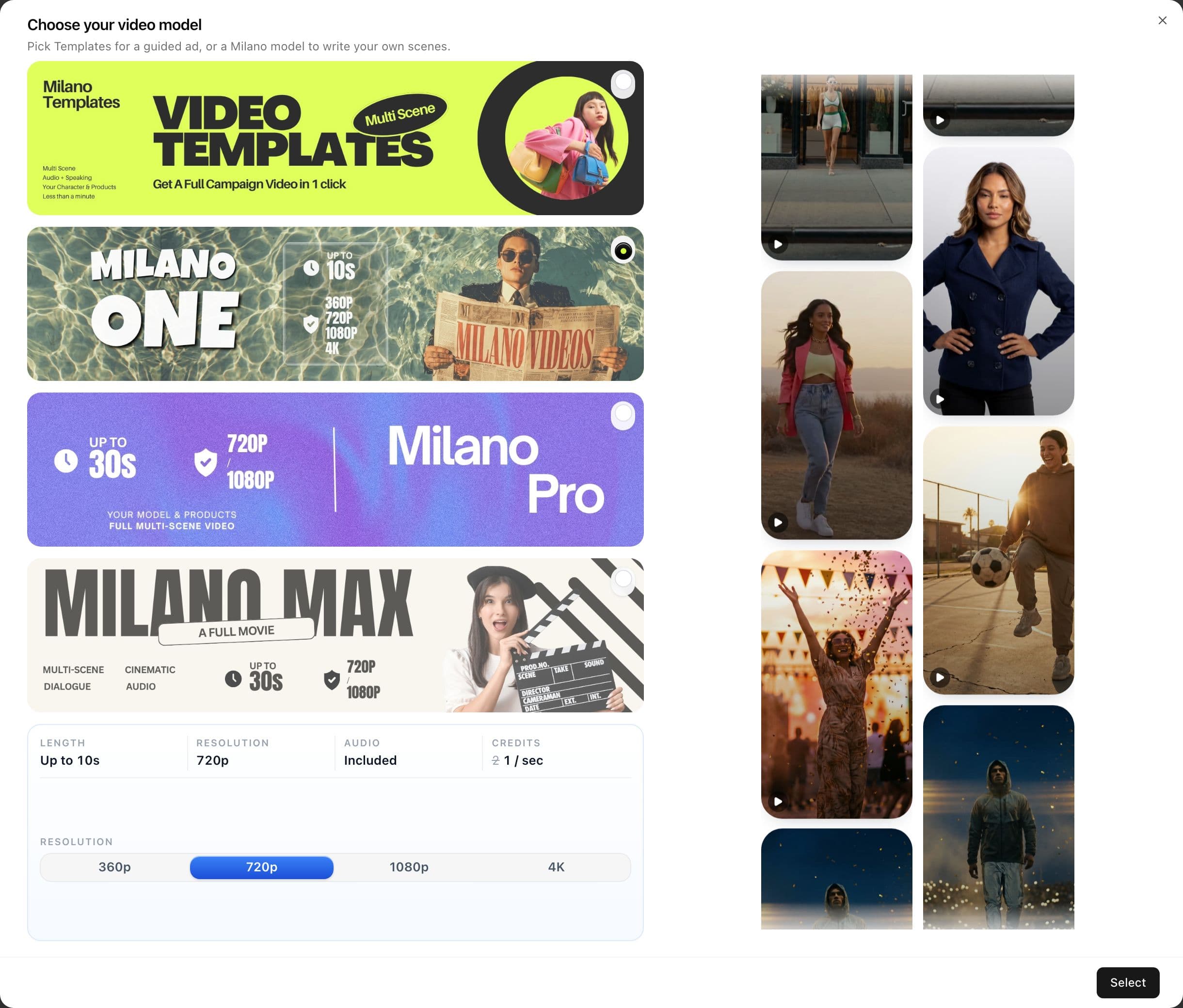
Video Pro model picker showing Templates, Milano One, Milano Pro, and Milano Max
Close-up: Templates for a guided ad, or Milano One / Pro / Max to write your own scenes.

How do I upload photos and tag them in a scene?

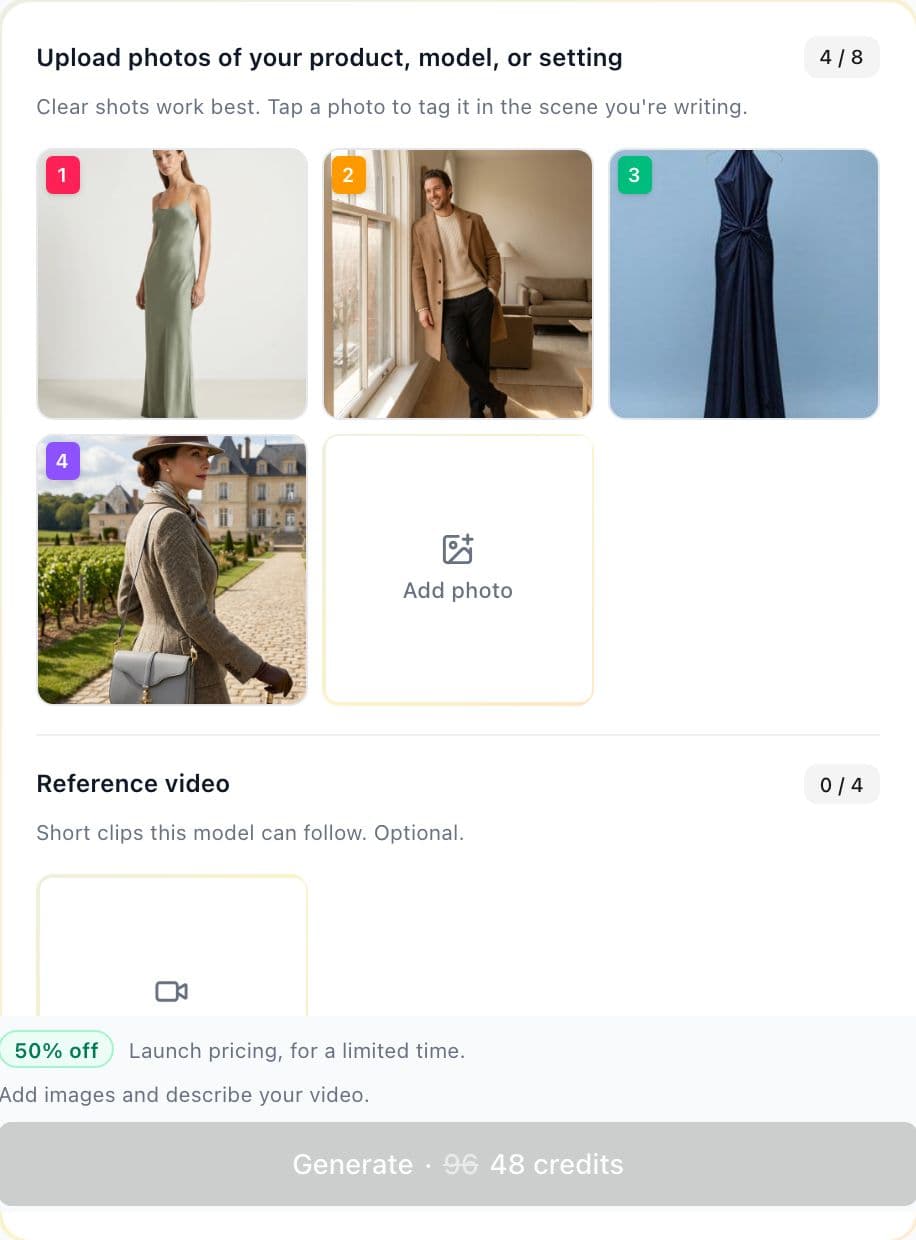
Upload photos of the product, the model, or the setting. Each filled slot gets a numbered badge. Type @ or tap the photo to drop that tag into the scene you are writing, so the clip uses that still instead of guessing.

  • Give each photo one job: this is the bag, this is the set, this is the look. Do not ask one still to be four products.
  • On Milano One you can switch How to use your photos: References to video (up to 10 stills) or Image to video (first frame required, last frame optional).
  • Milano Pro uses Frames: first frame is required, last frame is optional and becomes the final still.
  • Milano Max can also take short reference clips and reference audio. Skip faces on Max until the model accepts them.
Video Pro photo upload grid with four tagged fashion references and an Add photo slot
Close-up: numbered badges are the tags you insert into scene text. Optional reference video sits under the photos.

How should I split a video into scenes?

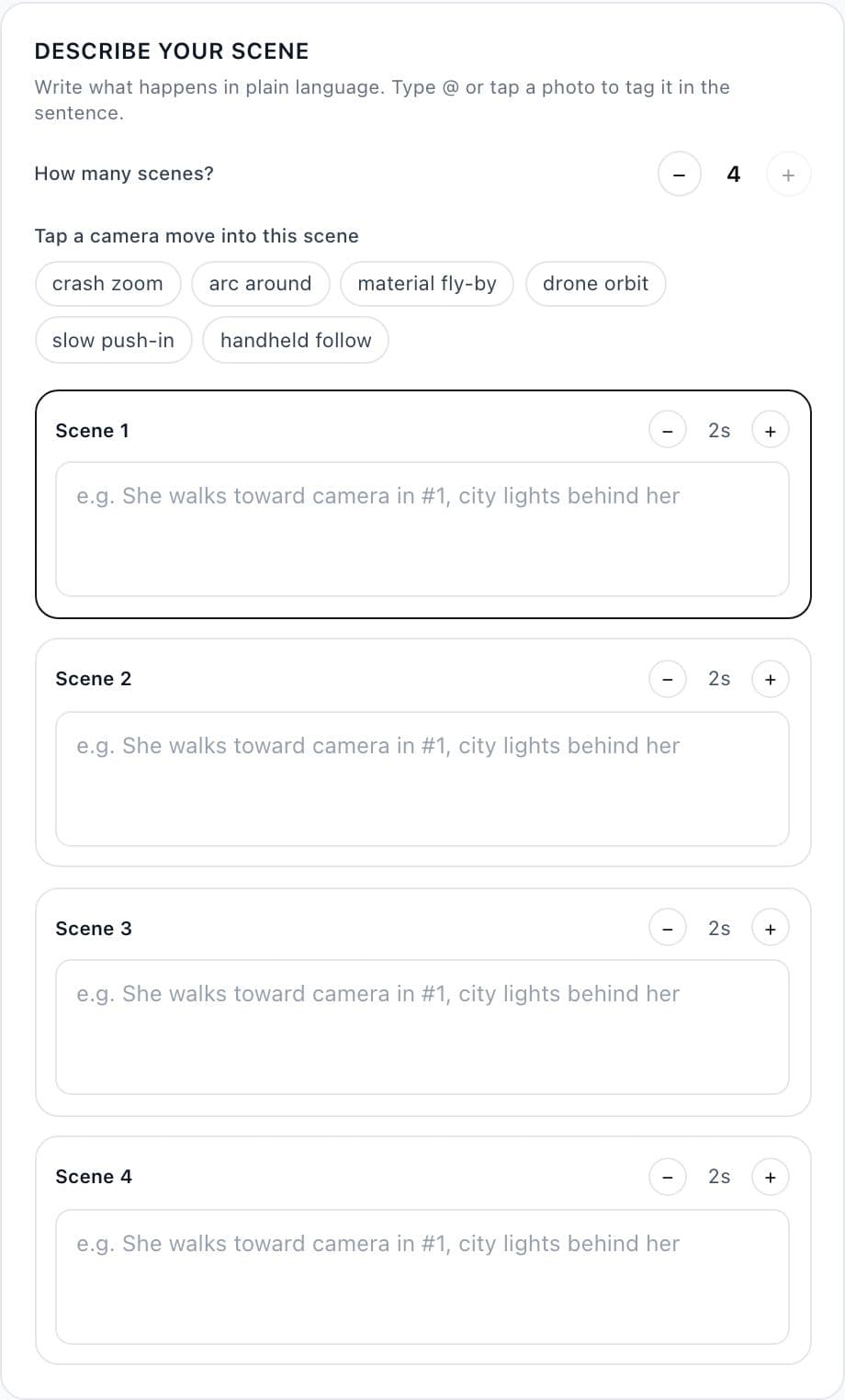
Scene boxes are the beats of the clip. Video Pro allows about one box per two seconds of length — an 8 second clip holds four scenes. Each box should be one event: start state, one action, end state, then a cut. Faster than two seconds per cut belongs as timestamps inside one box, not extra boxes.

  • Write in plain language. Tag photos instead of saying “the second image.”
  • Hard cut means a new scene, not a continuation. Reset the floor if you asked for an empty start each time.
  • On Max High, chips insert crash zoom, arc around, material fly-by, drone orbit, slow push-in, or handheld follow. Use them when the film should move.
  • If the shot must stay locked — overhead product, catalog still — say no zoom, no orbit, no tilt in the scene, or the fashion-film default will fight you.
Video Pro scene editor with four scene boxes, duration steppers, and camera move chips
Close-up: How many scenes? plus per-scene seconds. On Milano Max High, tap a camera move into the active scene.

What can I select before I generate?

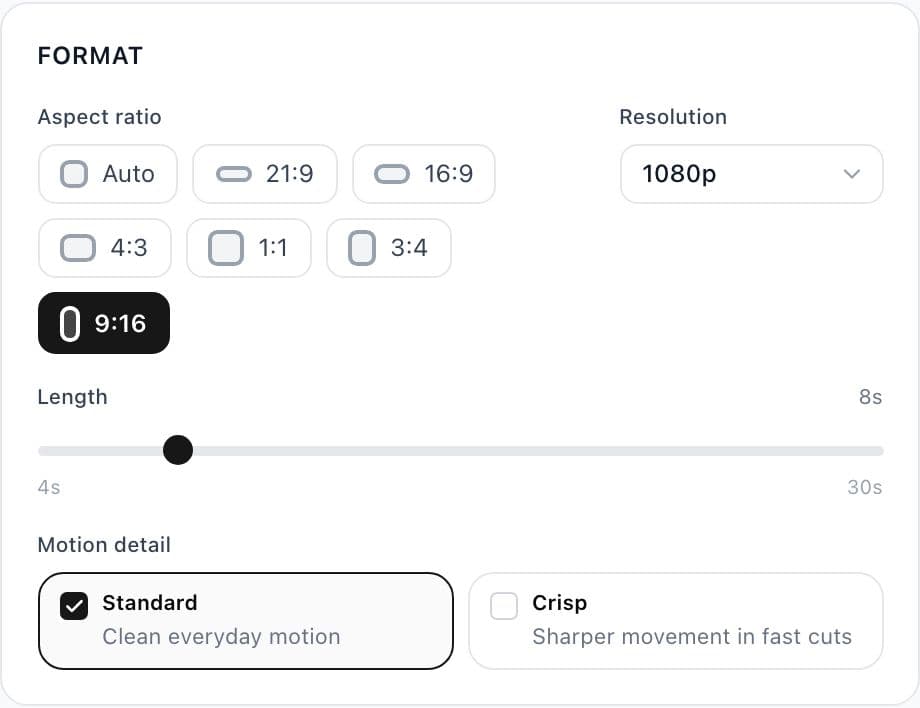
Format is separate from the prompt. Set aspect ratio for the channel, length for how many scene boxes you get, resolution, and on Max the motion-detail toggle. Sound is always on for Milano One; Pro and Max let you turn it on when you want music or speech.

  • 9:16 for Reels, TikTok, and Shorts. 16:9 for landscape. 1:1 for feed tests. Max also offers Auto, 21:9, 4:3, and 3:4.
  • Length is a slider. Max High runs 4–30 seconds. One caps at 10. Pro caps at 20.
  • Motion detail on Max: Standard for everyday motion, Crisp when fast cuts need sharper edges.
  • If someone should speak, write the line in the scene — for example: she looks at the camera and says "this is the one".
Video Pro Format panel with aspect ratios, 1080p, 8 second length, and Standard motion detail
Close-up: 9:16 for Reels and TikTok, 16:9 for YouTube, 1:1 for feed. Length drives how many scene boxes you can add.

How do you prompt a multi-scene clip?

Treat the prompt like a shot list. Lock what never changes, give each photo one job, then write one action per scene with a start, a move, and a cut.

Paste this shape into the scene boxes

  1. Goal — one sentence: film type and structure (placement film, walk, macros).
  2. Each tagged photo — one job and what not to copy (do not use this backdrop / use this bag only).
  3. Constants — camera, angle, light, feeling, no on-screen text.
  4. Scene N — initial state → one action → end state → cut.
  5. Sound — instrumental mood plus foley if sound is on. Skip speech unless you wrote a line.

Max scenes ≈ floor(length in seconds ÷ 2). An 8s clip = 4 boxes. Cuts shorter than 2s go as timestamps inside one box (0s–1s zipper, 1s–2s logo), not as extra scene counters.

How do I prompt camera angles in Video Pro?

Say shot size, angle, and movement in every scene if the camera must stay honest. On Milano Max High you can tap a chip into the active scene; still write the lock when you do not want that move.

Locked overhead

Flat-lay, bag on the floor, catalog still

static overhead, 50mm, no zoom, no orbit, no tilt

Crash zoom

Macro of zipper, logo, stitch, hardware

crash zoom into the detail, fill the frame, hard cut

Slow push-in

Hero portrait or three-quarter look

slow push-in, hold the last second on the product

Arc around

Garment on a body, show volume

arc around the model, keep the product readable

Material fly-by

Fabric, leather, quilting

material fly-by across the surface, keep texture sharp

Drone orbit

Wide fashion-film energy, not a locked product

drone orbit, keep the subject centered

Handheld follow

Walk, street, documentary feel

eye-level handheld follow, 35mm, product stays in frame

Placement beat

Empty set, then the product arrives

locked top-down, empty floor first, hand enters from the left, hard cut

Best practices before you generate

Bind each photo to one subject

Write what @Image1 is for and what to ignore. If the still already sits on the finished set, say so. If it is a packshot, say use the bag only, not the studio backdrop.

One primary change per scene

Empty floor → bag placed. Macro zipper → cut. Mixing two stories in one box makes the model average them.

Override fashion-film camera when you need a lock

Max High leans toward crash zooms and orbits. Repeat no zoom / no orbit in constants for overhead product films.

Keep format out of the prompt

9:16, 8 seconds, and 1080p are controls. Prompt the action, the camera, and the product. Leave “vertical video” out.

Starter prompts you can copy

Paste into scene boxes, then swap the product tags and timing to match your length.

Hero walk, Milano One

Fashion film, 8 seconds. @Image1 is the look and the garment. Eye-level, 35mm, city sidewalk at golden hour. Scene 1 (2s): she stands still, product readable. Scene 2 (2s): she walks toward camera, handheld follow. Scene 3 (2s): slow push-in to three-quarter. Scene 4 (2s): hold on the product, no on-screen text. (warm guitar, no lyrics)

First frame to last frame, Milano Pro

Start on the first frame: model wearing the product, wide street. End on the last frame: same model, closer three-quarter, product sharp. Slow push-in, natural walk, daylight, no zoom jump, no on-screen text.

Overhead placements, Milano Max

Locked overhead product film. Camera stays zenith, 50mm, midday sun, no zoom, no orbit, no tilt. @Image1 is the set. @Image2 @Image3 @Image4 are the bags only. Each 2s scene: empty floor, hand from the left places that bag, hard cut. (acoustic guitar) <leather landing on the surface>

Why does a scene-by-scene fashion video beat a single prompt?

A fashion clip has to keep the real garment honest while the camera moves. One blob of text usually drifts the product or invents a second story. Video Pro splits the job: the stills hold product truth, the scene boxes hold timing, and Format holds the channel. That is why a four-scene 8-second placement film, or a first-to-last walk on Milano Pro, reads more like a campaign than a random AI loop.

Video Pro questions

What is the difference between Milano One, Pro, and Max?

Milano One is the short social model (up to 10 seconds, sound always on). Milano Pro interpolates a first frame to an optional last frame, up to 20 seconds. Milano Max is the multi-reference film: 15 seconds on Low or 30 on High, with extra photos, optional clips, and camera chips on High.

How many scenes can I add in Video Pro?

About one scene box per two seconds of length. An 8-second clip holds four boxes. Cuts faster than two seconds belong as timestamps inside one box, not as extra counters.

How do I keep the product looking like my photo?

Upload a clear still, tag it with @ in the scene, and give that tag one job. Check color, silhouette, and hardware before you keep the clip. Do not mix two products in one tagged photo.

Should I write vertical video in the Video Pro prompt?

No. Set 9:16 (or another ratio) in Format. The prompt should describe action, camera, light, and which tagged photo to use.

Video Pro guide

Make the next clip in Video Pro

Open Video Pro, pick Templates or a Milano model, upload the stills, split the scenes, and generate a fashion clip for the channel you actually publish on.

Create Fashion Videos in Video Pro
Guide

Related tutorials