For fashion clips made from stills
IntroducingVideo Pro
Photos of the look go in. A clip comes out. You choose the model, tag each photo, split the seconds into scenes, and say what the camera does.
What it is
A studio for one fashion clip, scene by scene.
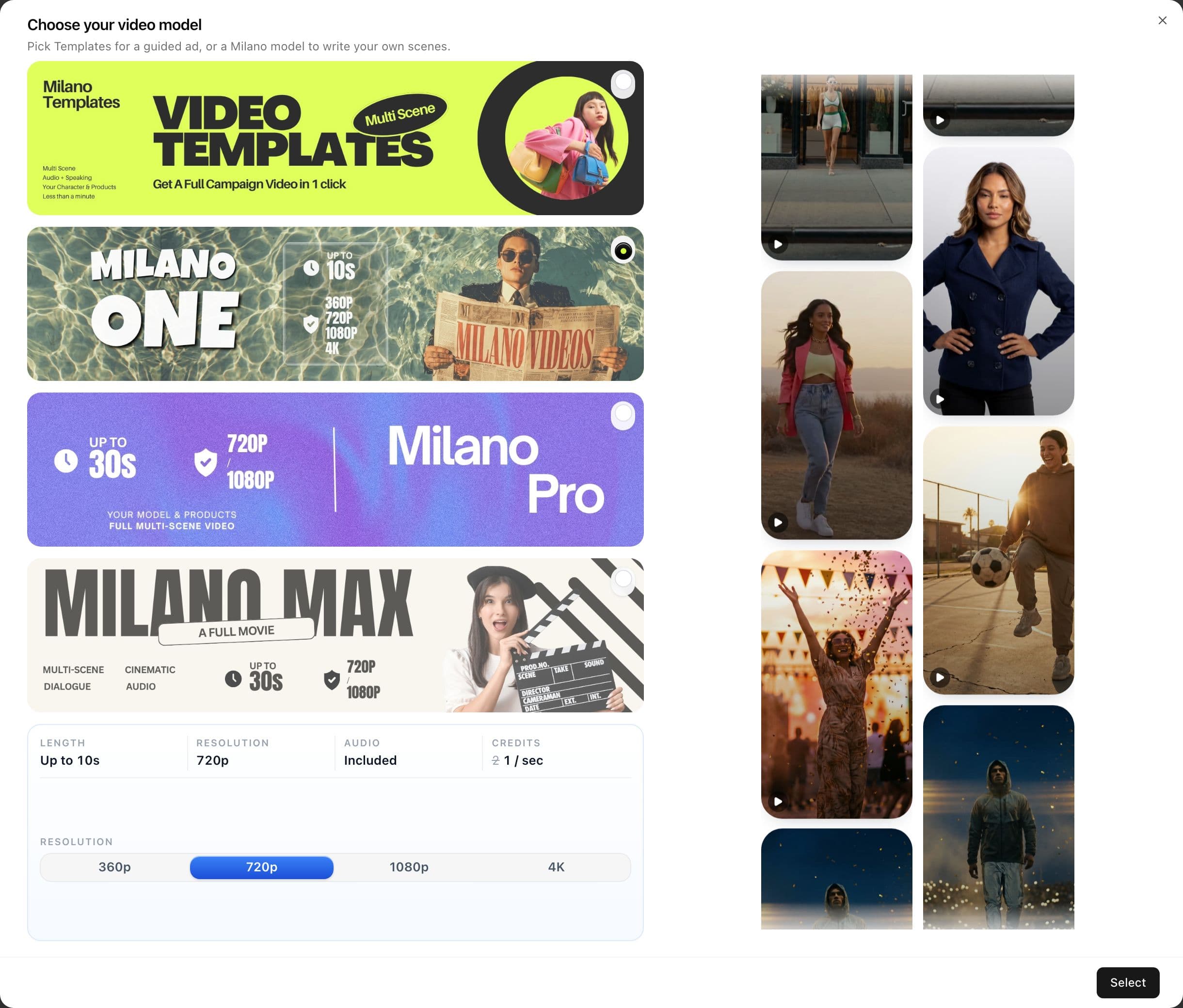
Video Pro is where a still becomes a moving shot. Templates runs a guided campaign. Milano One, Milano Pro, and Milano Max are where you write the scenes yourself.
Format holds the channel: ratio, length, resolution. The prompt holds the action, the camera, and which photo is which. Do not write “vertical video” in the prompt. Set 9:16 in Format.
The models
Four ways in. The length of the clip decides which one.
Open Choose your video model. The picker shows length, resolution, and whether sound is included before you press Select.
One generate is one clip. A series, or a campaign made of several spots, is the next generate after this one.
Templates
A guided campaign ad.
- Style is chosen for you
- Add photos, then generate
- Multi-scene, under a minute of setup
Milano One
A fast social story.
- 3–10 seconds
- Sound is always on
- Up to 10 photos, or a first frame and an optional last frame
- Up to 3 short clips, 3 seconds each
- 16:9 or 9:16 · 360p to 4K
Milano Pro
A start still and an end still.
- 5–20 seconds
- First frame required, last frame optional
- Sound is optional
- 16:9 or 9:16 · 720p or 1080p
Milano Max
The longer film, from several references.
- Low up to 15 seconds · High up to 30 seconds
- Photos, short clips, and audio files
- A face photo can be one of the references
- High adds camera chips
- More ratios, including 9:16, 1:1, and 21:9 · 720p or 1080p
What you can make
Fashion jobs these clips are actually for.
Stay inside one generate. A social post, a lookbook reel, a product beat, a short story up to 30 seconds on Max High. A full series is several clips.
Social
Milano One · 9:16 · up to 10s
A walk, a turn to camera, the product in hand. Sound is already on.
Lookbook cuts
Milano Max High
Hard cuts around two seconds: three-quarter, fabric, construction. One change per scene.
Product
Locked camera
Overhead placement or a slow push-in. The garment stays the photo. Say no zoom when the shot must not wander.
Macro
Crash zoom
Zipper, stitch, button, quilting. Fill the frame with one detail, then cut.
Several angles
Arc, orbit, a second still
Front, side, back. Each angle is its own scene, or its own tagged photo.
Action
Handheld follow
A walk, fabric in the wind, a street. Eye level. One action in the box.
A short story
Milano Max High · up to 30s
Arrive, turn, detail, hold. Scene boxes are the beats of that one clip.
A campaign
Templates, or several clips
Templates when the style should be chosen for you. Several Max clips when each spot needs its own prompt.
A series is the next clip. This page does not turn one generate into an episode.
Photos, face, clips, audio
Each file has one job. Tag it so the clip cannot guess.
Upload the product, the person, or the set. Each filled slot gets a number. Type @ or tap the photo to drop that tag into the scene you are writing.
On Milano Max, a face photo can sit next to the garment. Say what it is for. @Image1 is her face. @Image2 is the coat only — do not copy the studio backdrop.
1 job
Per photo
The bag, the set, or the person. Not four products in one still.
Face
On Max
A face photo is a reference. It does not replace the garment still.
Clips
One and Max
Optional short video the model can follow. Pro does not take clips.
Audio file
Max only
Voice, music, or a sound to follow. One and Pro do not take an audio file.

Format
Ratio, length, and resolution are controls. Leave them out of the sentence.
9:16 for Reels, TikTok, and Shorts. 16:9 for a wide cut. 1:1 when the post is a square. Max also offers Auto, 21:9, 4:3, and 3:4. One and Pro stay on 16:9 and 9:16.
Length sets how many scene boxes you get. On Max, Standard motion is everyday movement. Crisp is for fast cuts that need sharper edges.

How you prompt
One event per scene. The seconds sit in the brackets.
Write in plain language. Video Pro turns each box into a line the model can read: Scene 1 (2s), Scene 2 (2s), and so on.
About one box per two seconds. An 8 second clip holds four scenes. Cuts faster than that stay inside one box, with the times written in the sentence: 0s–1s zipper, 1s–2s logo.
The order that holds
- 1One sentence for the film: lookbook, walk, or placement.
- 2Each @ tag gets one job, and what not to copy.
- 3What stays put: camera, light, no on-screen text.
- 4Each scene: start, one action, end, cut.
- 5Sound, if it is on: music, the noises in the room, a spoken line only if you want one.
A hard cut is a new scene. Do not continue the last action into the next box unless you mean one continuous move.

Camera
Name the shot. On Max High you can tap it in.
Say the size, the angle, and the move when the camera has to stay honest. Max High chips insert crash zoom, arc around, material fly-by, drone orbit, slow push-in, or handheld follow.
If the shot must stay locked, write no zoom, no orbit, no tilt. High leans toward a moving fashion film, and that default will fight a still product shot.
Locked overhead
Flat-lay, bag on the floor
static overhead, no zoom, no orbit, no tilt
Crash zoom
Zipper, logo, stitch
crash zoom into the detail, fill the frame, hard cut
Slow push-in
Hero three-quarter
slow push-in, hold the last second on the product
Arc around
Show the volume of a garment
arc around, keep the product readable
Material fly-by
Fabric, leather, quilting
material fly-by across the surface
Drone orbit
A wide fashion-film beat
drone orbit, subject stays centered
Handheld follow
Walk, street
eye-level handheld follow, product stays in frame
Placement
Empty set, then the product arrives
locked top-down, empty floor first, hand from the left, hard cut
Sound
Say the track in the scene. On Max you can also hand it a file.
Milano One always generates sound. Pro and Max have a switch. If someone should speak, write the line in the scene: she looks at the camera and says "this is the one".
On Milano Max you can upload reference audio — voice, music, or a sound — and the clip can follow it. One and Pro do not take that file. They only hear what you write.
( )
Music
(warm acoustic guitar, instrumental, no lyrics)
< >
The room
<leather landing, zipper, soft room tone>
“ ”
A line
she looks at the camera and says "this is the one"
A prompt you can paste
An 8 second lookbook on Milano Max High.
Four boxes, two seconds each. One photo for her, one photo for the coat. Music in parentheses, the room in angle brackets, no titles on screen.
The model reads it like this. In the studio, each scene is its own box and the seconds are the stepper — Video Pro adds the Scene line.
Fashion lookbook, hard cuts. @Image1 is her face and the front of the coat. @Image2 is the coat only — do not use its backdrop. Daylight, no on-screen text.

Scene 1 (2s): she stands three-quarter, coat readable, slow push-in.
Scene 2 (2s): crash zoom into the stitch and button. Hard cut.
Scene 3 (2s): arc around, fabric moves, product stays in frame.
Scene 4 (2s): hold on the collar. No zoom.

(soft piano, no lyrics)
<coat fabric, quiet room>
Open it
Make the clip in Video Pro.
Pick the model, tag the stills, split the seconds, and generate. The written guide sits next to this page if you want the same steps as a checklist.
