
Stop Losing Sales to Bad Product Photos: 6 Product Photography Tips That Actually Convert
Bad product photos are killing your conversion rates. Learn 6 actionable product photography tips for fashion e-commerce—from lighting setup to camera settings to editing workflow. Then discover how Milano AI automates the entire process, cutting costs by 95% and scaling production 10x.
Your product photos are costing you money. Not because photography is expensive—but because mediocre images tank conversion rates. A poorly lit dress looks dull. A blurry detail shot loses the sale. An inconsistent catalog tells customers you're unprofessional. Meanwhile, competitors with clean, sharp, studio-quality photos win the customers you're losing.
The problem isn't budget or equipment. Most fashion e-commerce brands simply don't know the fundamentals—the lighting setup, camera settings, and editing workflow that separate photos that convert from photos that don't. Let's fix that.
1. Master Your Lighting Setup First (Everything Else Follows)
If you take away one thing from this guide: lighting is 80% of product photography. Get lighting right, and your photos look professional. Get it wrong, and no amount of editing saves you.
The Three-Light Foundation
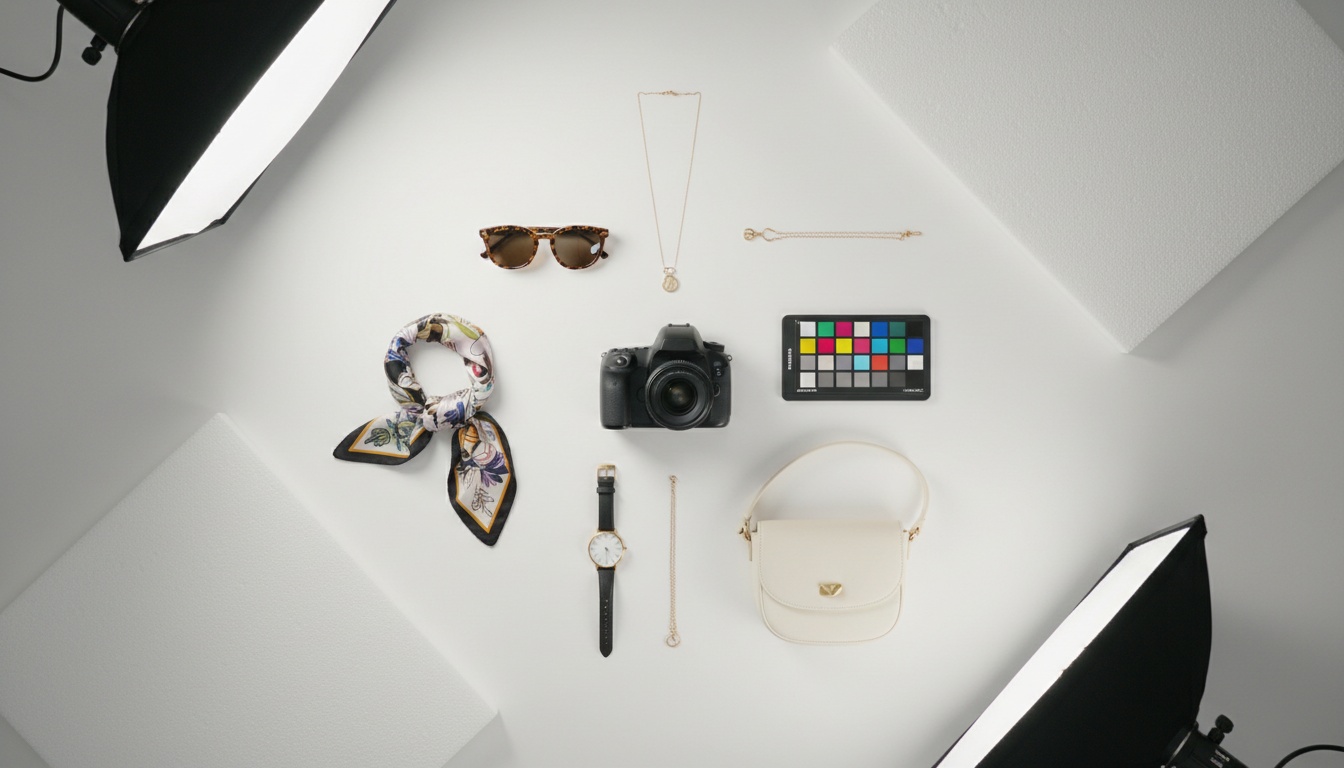
Professional product photography uses three light sources:
- Key Light: Your primary light source. Position it at 45 degrees to your product, slightly to one side of your camera. This creates dimension and highlights shape and texture without harsh shadows.
- Fill Light: Softens shadows created by your key light. Place it opposite the key light at lower intensity. The goal isn't eliminating shadows—it's controlling them so you see product details without harsh, unflattering contrast.
- Backlight: Separates your product from the background and adds depth. A softbox positioned behind your product creates that clean, professional look that signals quality.
Starting out? You don't need expensive strobes. Continuous LED lights or even natural daylight work beautifully if you understand placement and diffusion.
The Diffusion Secret Nobody Talks About
Raw light creates harsh shadows and reflections. Diffusion softens it. Place a diffuser as close as possible to your product—whether that's a softbox, white foam board, or white fabric. This creates the soft, even illumination that makes products look premium.
2. Get Your Camera Settings Right (So Your Images Are Actually Sharp)
Camera gear matters less than you think. Your phone, DSLR, or mirrorless camera can all produce professional-looking product photos. What matters is understanding three settings that determine image quality: aperture, shutter speed, and ISO.
- Aperture: Use a small aperture (high f-stop number, like f/8, f/11, or f/16) to keep your entire product in focus from front to back. This is critical for fashion—you need every button, seam, and detail visible.
- ISO: Keep it at 100-200. Higher ISO values create grain and noise that screams amateur. Since you're using controlled lighting, you have enough light to keep ISO low.
- Shutter Speed: Aim for 1/125 to 1/250 seconds—fast enough to eliminate camera shake, slow enough that your lights expose properly. Use a tripod to eliminate movement entirely. A tripod is non-negotiable for professional product photography.
One more setting: Shoot in RAW format. RAW preserves all image data, giving you maximum flexibility in editing without losing quality.
3. Composition and Background: Keep It Clean and On-Brand
Your background should work with your product, not against it. For most fashion e-commerce, this means simplicity.
The White Background Standard
White backgrounds are the e-commerce default for a reason: they're clean, professional, and don't distract from the product. Use white foam board, paper, or acrylic backdrops. For high-end products or creative lifestyle shots, experiment with gray or subtle textures, but keep focus on your product.
The Reflective Acrylic Plate Trick
Here's a technique used by professional product photographers: place your product on a white, shiny acrylic plate. The reflective surface creates a subtle reflection underneath your product, adding dimension and sophistication without looking artificial. Position a second acrylic plate vertically behind your product and backlight it for a clean background.

Multiple Angles Matter
Give customers a complete view. Shoot your product from front, back, sides, and angles that highlight key details. For fashion, this means full-body shots, close-ups of fabric texture, seams, or care tags. Multiple perspectives reduce returns and build buyer confidence.
4. Editing: Enhance Without Over-Processing
Good photography requires good editing, but the goal isn't to transform your product—it's to present it accurately and attractively.
The Accuracy-First Approach
Your edits should match how the product looks in real life. Fix white balance so colors are true. Sharpen details to make textures pop. Increase contrast slightly to make your product stand out. But avoid aggressive filters or unrealistic color shifts—customers who see a different product in person will return it and leave bad reviews.
What to Clean Up
Remove dust, lint, and sensor spots. Crop intelligently so the product fills the frame without awkward empty space. Ensure consistent cropping across your catalog so your grid looks professional on your website and social media.
5. Build a System for Speed and Consistency
If you're managing an e-commerce catalog with dozens or hundreds of SKUs, you can't treat each product photo as a standalone creative project. You need a system.
Standardize Your Setup
Use the same lighting configuration, background, and camera settings for all similar products. This creates visual consistency that signals professionalism. Your customers should feel like they're shopping from a curated, professional brand—not a random collection of phone snapshots.
The Problem With DIY Product Photography (And Why You're Running Out of Time)
Creating studio-quality product photos for an e-commerce catalog is time-intensive. You're learning lighting, managing camera settings, editing hundreds of images, reshooting when the catalog updates, creating variations for different contexts (marketplace listings, social media, email), and maintaining consistency across all of it.
Meanwhile, your competitors are moving faster. They're launching new products, testing seasonal variations, responding to trends, and refreshing their catalogs regularly. They're creating not just white-background shots, but lifestyle images, campaign imagery, video content, and AI-generated variations.
The math doesn't work. You either sacrifice time, consistency, or quality—or you need a better system.
How Milano AI Transforms Your Product Photography Workflow
This is where Milano AI enters the picture.
Milano AI is built exclusively for fashion and e-commerce brands. It solves the product photography problem by automating the entire workflow—from uploading your raw product photos to generating unlimited variations in minutes.
What You Can Do With Milano AI
- Transform Photos Into Campaign Imagery: Upload a standard product photo, and Milano AI generates professional campaign visuals, lifestyle scenes, and styled variations—automatically. No photoshoots, no models, no studios.
- Generate Marketplace-Optimized Images: Create white-background shots, lifestyle contexts, ghost mannequin effects, and platform-specific variations (Amazon, eBay, Shopify) from a single product photo.
- Bulk Upload and Scale: Upload your entire catalog at once. Milano AI processes every SKU, creating complete variations for each product in minutes instead of weeks.
- AI-Powered Editing: Need background removal? Color changes? Detail adjustments? Milano AI's photo editor handles requests in plain English, maintaining professional quality that rivals traditional photography.
- Extend to Full Marketing Automation: Beyond photos, Milano AI is your complete marketing suite. Generate SEO-optimized blog content, create AI avatar product videos, design interactive catalogs and lookbooks, automate social media posts, and launch full video campaigns—all from one dashboard built for fashion.
The Real Advantage: Speed and Cost
Traditional product photography costs add up fast: photographer fees, studio rental, model fees, equipment, editing hours, and retakes. Milano AI eliminates those costs.
You cut content creation costs by up to 95% and scale production 10x. What used to take weeks of traditional workflows—shooting, hiring talent, editing, creating variations, managing marketplace-specific formats—now happens in minutes.
For indie labels and mid-size fashion brands managing everything yourself, this is transformative. You're not replacing the fundamentals in this guide—you're amplifying them. You still want to understand product photography principles. But Milano AI handles the execution at scale, letting you focus on strategy, design, and growing your business.
Why Fashion Brands Choose Milano AI
Milano AI isn't a generic AI tool. It's built specifically for fashion. It understands clothing fit, fabric textures, color accuracy, and the nuanced details that matter to fashion buyers. It learns your brand aesthetic and applies that consistently across every generated image.
Whether you're a Shopify store owner, a DTC brand founder, a marketing manager at a mid-size retailer, or managing social media for a fashion agency—Milano AI integrates into your workflow as the operating system for your content and marketing operations.
You upload products, set your preferences, and Milano AI handles everything: catalog images, campaign variations, blog content, video content, social media scheduling, and competitive intelligence—all optimized for conversions across e-commerce platforms, social media, search engines, and AI recommendation systems.
Bringing It All Together
Studio-quality product photography is non-negotiable for fashion e-commerce. Your images are often the first (and only) thing a customer sees before deciding to buy. Get the fundamentals right—master your lighting, nail your camera settings, keep your backgrounds clean, and edit with accuracy.
But don't stop there. Once you understand the basics, scale intelligently. Use tools and systems that let you create, manage, and optimize product photography across your entire catalog without burning out.
For fashion brands serious about growth, that's where Milano AI comes in. It's the technology layer that lets you apply professional photography principles at scale—creating the consistent, high-quality visual content that turns browsers into buyers.
Start with the tips in this guide. Master the fundamentals. Then automate the repetition so you can focus on what actually drives your business forward: strategy, creativity, and growth.
Frequently Asked Questions
The most critical product photography tips are: (1) Master your lighting setup with a three-light system (key light, fill light, backlight) positioned at 45-degree angles, (2) Use correct camera settings (small aperture f/8-f/16, low ISO 100-200, shutter speed 1/125-1/250), (3) Shoot on clean white backgrounds for consistency, (4) Capture multiple angles (front, back, sides, detail shots), (5) Edit for accuracy without over-processing, and (6) Build a standardized system for consistency across your catalog. These fundamentals separate professional product photos that convert from amateur shots that lose sales.
Scale Your Fashion E-Commerce with AI
Create professional campaigns and product photography in minutes. Start with 10 free credits—no credit card required.
Related Articles
Professional Product Videos with AI: The Ultimate Q&A Guide for Fashion Brands
Learn how fashion e-commerce brands can create professional product videos with AI, replacing expensive photoshoots with automated video generation. This Q&A guide covers AI avatars, conversion optimization, and scaling video content across your entire catalog—cutting costs by 95% while accelerating production from weeks to minutes.

AI Lifestyle Videos: Compare Top Tools for Fashion Brands in 2026 | Milano AI Guide
Compare top AI lifestyle video tools for fashion e-commerce in 2026. Detailed analysis of Synthesia vs HeyGen vs Runway ML vs Pika Labs vs Milano AI. Learn which platforms deliver ROI for DTC brands, with actionable implementation strategies and cost comparisons. Cut video production costs by 95% while scaling output 10x.

Marketplace Video Optimization: How Fashion Brands Scale Conversions 30%+ in 2026
Fashion brands see 30%+ conversion lifts with optimized marketplace videos, but manual production fails at scale. Learn the cause-and-effect strategies driving success on Amazon, Etsy, and Shopify in 2026—from AI compression eliminating load penalties to shoppable overlays converting views into sales. Complete guide with actionable tactics for DTC brands and retailers.